DeepSeek-R1 是一款由深度求索推出的推理模型,通过引入强化学习(RL)前的冷启动数据训练,有效解决了重复生成、可读性差及多语言混杂等问题。该模型在数学、代码与逻辑推理任务中表现卓越,性能对标 OpenAI-o1。其创新训练框架突破了传统 RL 训练的局限性,为复杂推理任务提供了高效解决方案。
本文以 DeepSeek-R1-Distill-Qwen-7B 为例,在 JupyterLab 开发环境中部署模型并进行对话。
前提条件
下载模型文件
本次部署的模型是 DeepSeek-R1-Distill-Qwen-7B,执行下面的命令将模型文件下载到本地(约14.1GB)。
pip install -U huggingface_hub
export HF_ENDPOINT=https://hf-mirror.com
huggingface-cli download --resume-download deepseek-ai/DeepSeek-R1-Distill-Qwen-7B --local-dir ./
也可选择下载 DeepSeek-R1 Models 或 DeepSeek-R1-Distill Models.
| Model | Total Params | Activated Params | Context Length | Download |
|---|---|---|---|---|
| DeepSeek-R1-Zero | 671B | 37B | 128K | HuggingFace |
| DeepSeek-R1 | 671B | 37B | 128K | HuggingFace |
| Model | Base Model | Download |
|---|---|---|
| DeepSeek-R1-Distill-Qwen-1.5B | Qwen2.5-Math-1.5B | HuggingFace |
| DeepSeek-R1-Distill-Qwen-7B | Qwen2.5-Math-7B | HuggingFace |
| DeepSeek-R1-Distill-Llama-8B | Llama-3.1-8B | HuggingFace |
| DeepSeek-R1-Distill-Qwen-14B | Qwen2.5-14B | HuggingFace |
| DeepSeek-R1-Distill-Qwen-32B | Qwen2.5-32B | HuggingFace |
| DeepSeek-R1-Distill-Llama-70B | Llama-3.3-70B-Instruct | HuggingFace |
操作步骤
上传模型文件
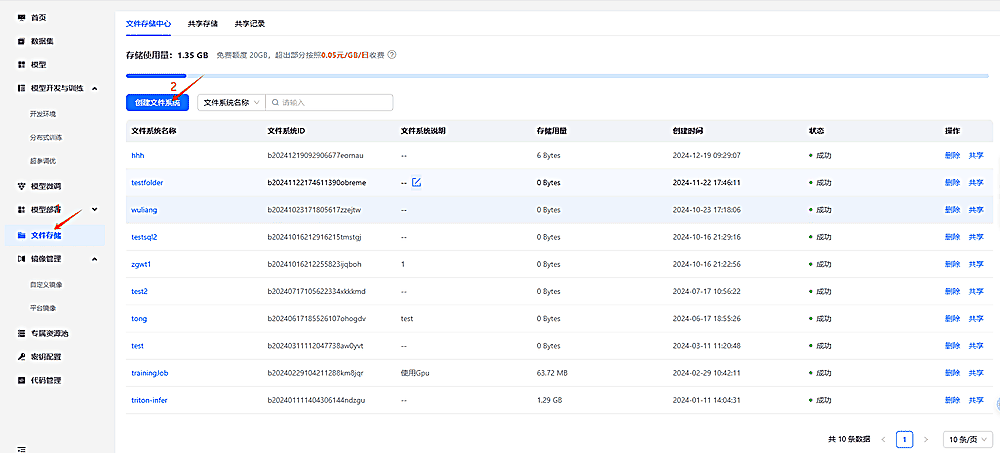
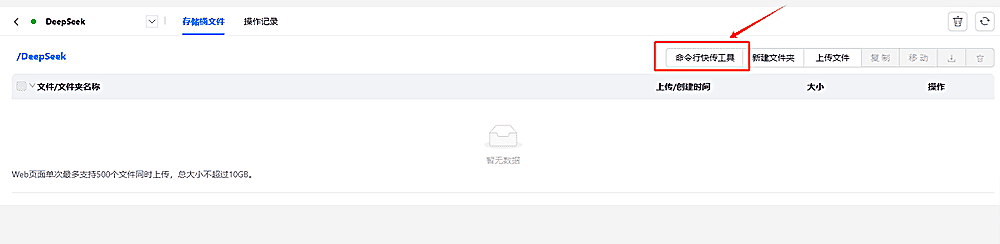
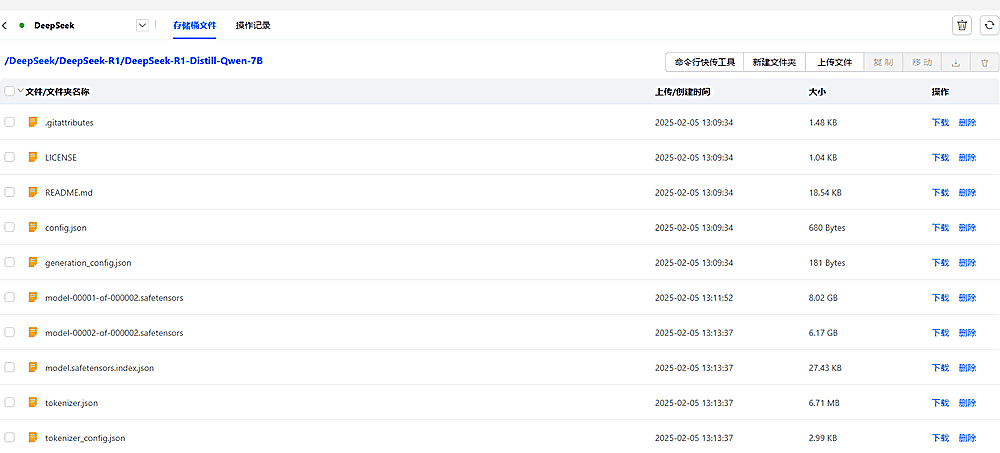
在文件存储中创建文件系统(已存在可不创建),并使用命令行工具将下载好的本地模型文件上传到对应的文件系统中。下方示例中,文件系统名称为 DeepSeek.
创建模型
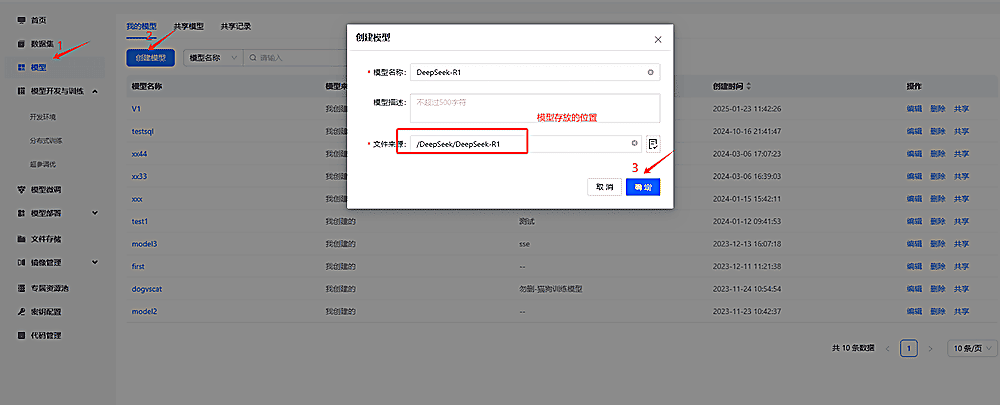
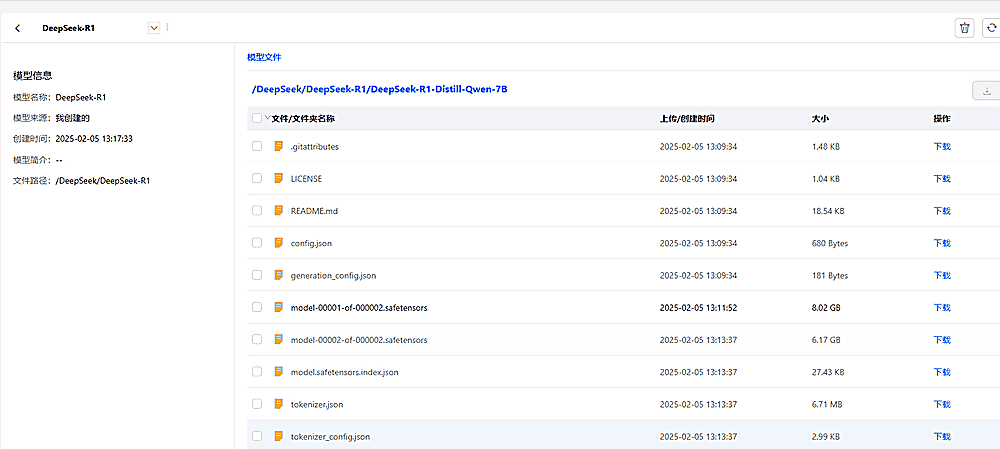
为了便于后续反复使用,将文件系统中的模型文件,在平台的「模型」板块中创建对应的 DeepSeek-R1 模型。
点击左边栏模型按钮,然后点击创建模型按钮,通过上面上传的模型文件来创建模型实例,创建模型后如下所示。
创建JupyterLab开发环境
在「模型开发和训练」中,创建新的开发环境。
1、首先在存储挂载的地方点击模型,添加上面创建的模型;
2、选择支持 JupyterLab 或 SSH 访问的镜像;
3、然后选择 1 GPU 套餐资源;
详细操作详见模型开发。
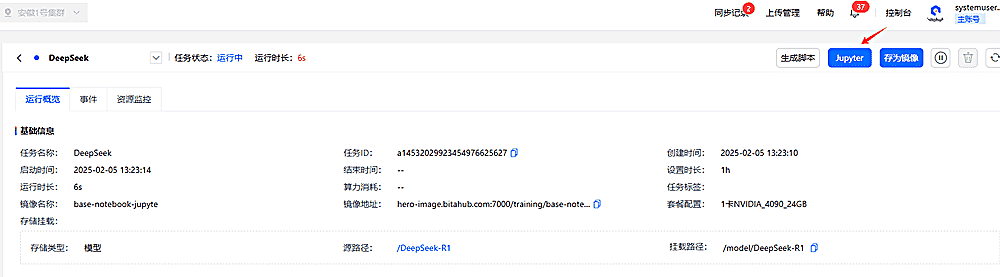
创建任务后,等待任务进入运行状态:
准备推理脚本
打开 JupyterLab 后,挂载的模型文件在 /model/<模型名称> 目录下,比如上面挂载的模型文件路径是 /model/DeepSeek-R1.
我们将推理脚本放在模型文件目录下,编辑文件 /model/DeepSeek-R1/infer.py 写入下面的代码。
import torch
from transformers import AutoTokenizer, AutoModelForCausalLM
import unicodedata
from typing import List

@torch.inference_mode()
def generate(
    model: AutoModelForCausalLM,
    input_ids: torch.Tensor,
    attention_mask: torch.Tensor,
    max_new_tokens: int,
    temperature: float = 1.0
) -> List[int]:
    """
    Generate response from the model with attention_mask provided.
    """
    outputs = model.generate(
        input_ids=input_ids,
        attention_mask=attention_mask,  # 提供显式 attention mask
        max_new_tokens=max_new_tokens,
        temperature=temperature,
        eos_token_id=model.config.eos_token_id,
        pad_token_id=model.config.eos_token_id,
        do_sample=True,
        top_k=50,
        top_p=0.95,
    )
    return outputs[0].tolist()

def clean_input(user_input):
    """
    清理用户输入,去除不可见字符和多余的空格。
    """
    user_input = "".join(c for c in user_input if not unicodedata.category(c).startswith("C"))  # 移除控制字符
    return user_input.strip()  # 去除首尾空格

def clean_message_content(content):
    """
    清理消息内容,去除首尾空格并过滤非法输入
    """
    if not content or not isinstance(content, str):
        return ""
    return content.strip()  # 去除首尾空格

def build_prompt(messages, max_history=3):
    """
    Build prompt for the model, limiting the history to the most recent messages.
    """
    template = "The following is a conversation with an AI assistant. The assistant is helpful, knowledgeable, and polite:\n"
    for msg in messages[-max_history:]:
        content = clean_message_content(msg["content"])
        if not content:  # 跳过空内容
            continue
        template += f"{msg['role'].capitalize()}: {content}\n"
    template += "Assistant: "
    return template.strip()  # 确保返回值是字符串

if __name__ == "__main__":
    print("Initializing DeepSeek-R1 Service...")

    # Configuration
    ckpt_path = "./DeepSeek-R1-Distill-Qwen-7B"  # 模型所在的目录
    config_path = "./DeepSeek-R1-Distill-Qwen-7B/config.json"  # 配置文件路径

    # Load tokenizer and model
    tokenizer = AutoTokenizer.from_pretrained(ckpt_path)
    model = AutoModelForCausalLM.from_pretrained(
        ckpt_path,
        torch_dtype=torch.bfloat16,
    ).cuda()

    # Interactive session
    messages = []  # To maintain context
    while True:
        user_input = input("You: ").strip()  # 去除首尾空格
        user_input = clean_input(user_input)  # 清理不可见字符
        if not user_input or len(user_input.strip()) == 0:  # 检查无效输入
            print("Invalid input. Please type something meaningful!")
            continue

        if user_input.lower() in ["exit", "quit"]:
            print("Exiting conversation. Goodbye!")
            break

        # Append user input to context
        messages.append({"role": "user", "content": user_input})

        # Limit conversation history
        messages = messages[-10:]  # 只保留最近 10 条对话

        # Build prompt and tokenize
        prompt = build_prompt(messages)
        if not isinstance(prompt, str) or len(prompt.strip()) == 0:  # 确保 prompt 非空
            print("Error: Prompt is empty or invalid. Skipping this turn.")
            continue

        tokenized_prompt = tokenizer(prompt, return_tensors="pt", truncation=True, padding=True)
        input_ids = tokenized_prompt["input_ids"].to("cuda")
        attention_mask = tokenized_prompt["attention_mask"].to("cuda")

        # Generate response
        max_new_tokens = 150
        temperature = 0.7

        completion_tokens = generate(model, input_ids, attention_mask, max_new_tokens, temperature)
        completion = tokenizer.decode(
            completion_tokens[len(input_ids[0]):],  # 从输入长度截取生成部分
            skip_special_tokens=True
        ).split("User:")[0].strip()

        print(f"Assistant: {completion}")

        # Append assistant response to context
        messages.append({"role": "assistant", "content": completion})
部署模型并对话
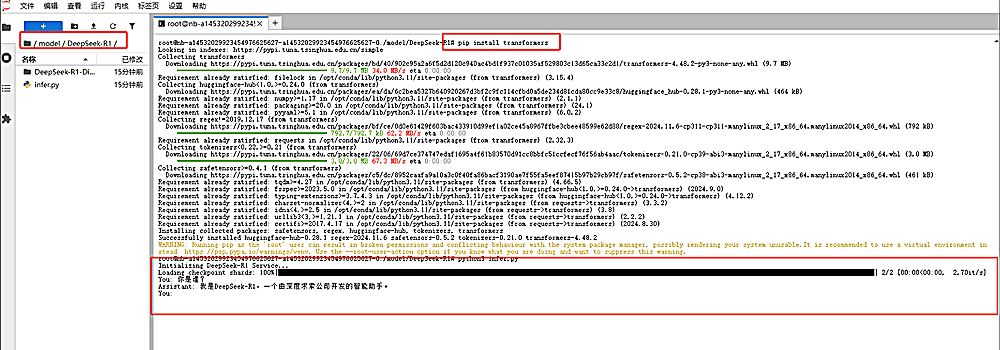
在 JupyterLab 中打卡 Terminal 并进入 /model/DeepSeek-R1 目录下,执行 python3 infer.py 即可和 DeepSeek-R1 进行对话。
注:因上述所选的镜像没有安装 transformers python 包,需要通过 pip install transformers 进行安装。